 2e2f556daf
* Updated README Added explanation for missing parameters (background, title and image) * Implemented changable icons for AppleScriptTouchBarItem AppleScriptTouchBarItem now allow to specify any number of icons which can be changed from the script. You cannot change icon from touch event. To change icon, you need to return array from your script with 2 values - title and icn name. More info in readme * Fixed #312 Fixed bug that margin is lost on all elements Co-authored-by: Fedor Zaitsev <lobster@Fedors-MacBook-Pro.local> |
||
|---|---|---|
| .github | ||
| MTMR | ||
| MTMR.xcodeproj | ||
| MTMRTests | ||
| Resources | ||
| Sparkle.framework | ||
| .gitignore | ||
| build.sh | ||
| export-options.plist | ||
| LICENSE | ||
| README.md | ||
| TECHNICAL_DEBT.md | ||
| test.sh | ||
My touchbar. My rules. 




The TouchBar Customization App for your MacBook Pro
My idea is to create a platform for creating plugins to customize the TouchBar. I very much like BTT and having a full custom TouchBar (my BTT preset), and I wanted to create it. It's my first Swift project for MacOS :)
Share your presets here
 Telegram



Installation
- Download lastest release (.dmg) from github
- Or via Homebrew
brew cask install mtmr - Dario Prski has written a fantastic article on medium that goes into more detail on installing MTMR
On first install you need to allow access for MTMR in Accessibility otherwise buttons like Esc, Volume, Brightness and other system keys won't work

🍏→ System Preferences → Security and Privacy → tab Privacy → Accessibility → MTMR
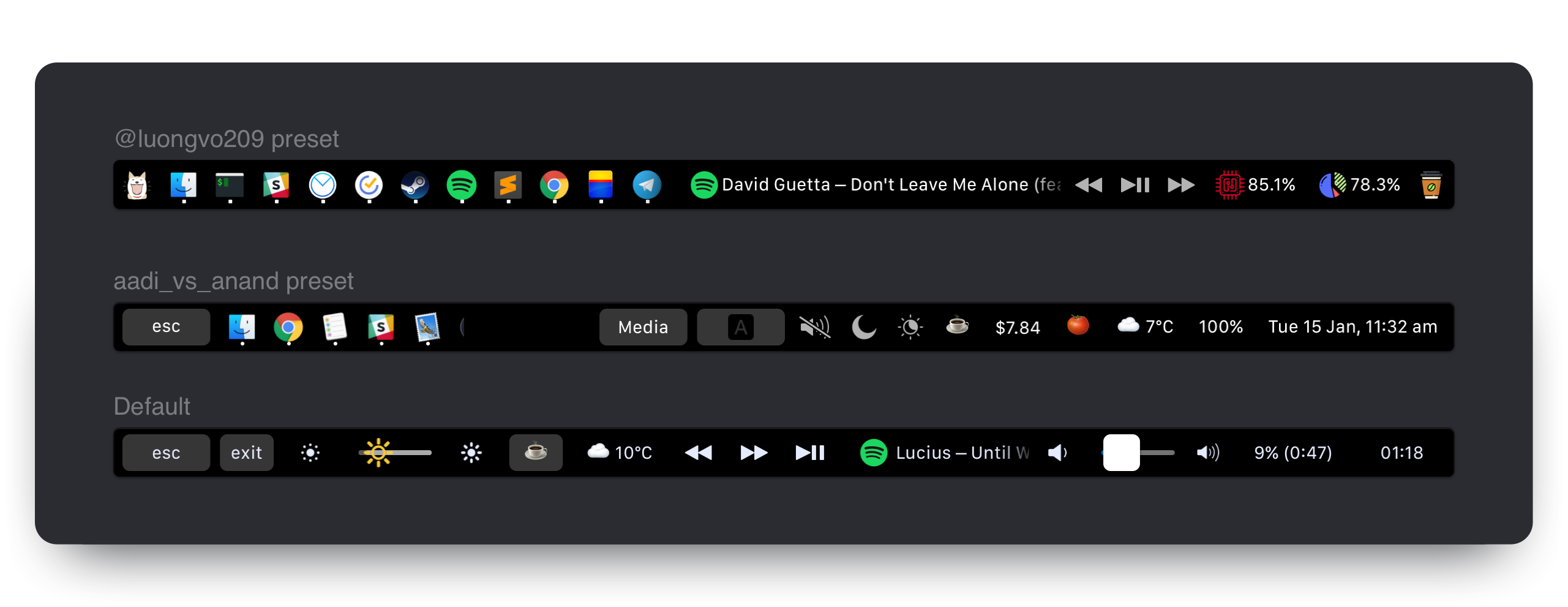
Examples
Customization
MTMR preferences are stored under ~/Library/Application\ Support/MTMR/items.json.
The pre-installed configuration contains less or more than you'll probably want, try to configure:
Built-in button types:
Buttons
- escape
- exitTouchbar
- brightnessUp
- brightnessDown
- illuminationUp (keyboard illumination)
- illuminationDown (keyboard illumination)
- volumeDown
- volumeUp
- mute
Native Plugins
- timeButton
- battery
- currency
- weather
- yandexWeather
- inputsource
- music (tap for pause, longTap for next)
- dock (half-long click to open app, full-long click to kill app)
- nightShift
- dnd (Don't disturb)
- darkMode
- pomodoro
- network
Media Keys
- previous
- play
- next
AppleScript plugins
- sleep
- displaySleep
Custom buttons
- staticButton
- appleScriptTitledButton
- shellScriptTitledButton
Gestures
By default you can enable basic gestures from application menu (status bar -> MTMR icon -> Volume/Brightness gestures):
- two finger slide: change you Volume
- three finger slide: change you Brightness
Custom gestures
You can add custom actions for two/three/four finger swipes. To do it, you need to use swipe type:
    "type": "swipe",
    "fingers": 2,            // number of fingers required (2,3 or 4)
    "direction": "right",    // direction of swipe (right/left)
    "minOffset" 10,          // optional: minimal required offset for gesture to emit event
    "sourceApple": {         // optional: apple script to run
        "inline": "beep"
    },
    "sourceBash": {          // optional: bash script to run
        "inline": "touch /Users/lobster/test"
    }
You may create as many swipe objects in the preset as you want.
Built-in slider types:
- brightness
- volume
You can also make custom buttons using these types
staticButton
 "type": "staticButton",
 "title": "esc",
appleScriptTitledButton
  {
    "type": "appleScriptTitledButton",
    "refreshInterval": 60, //optional
    "source": {
      "filePath": "~/Library/Application Support/MTMR/iTunes.nowPlaying.scpt",
      // or
      "inline": "tell application \"Finder\"\rif not (exists window 1) then\rmake new Finder window\rset target of front window to path to home folder as string\rend if\ractivate\rend tell",
      // or
      "base64": "StringInbase64"
    },
  }
Note: appleScriptTitledButton can change its icon. To do it, you need to do the following things:
- Declarate dictionary of icons in
alternativeImagesfield - Make you script return array of two values -
{"TITLE", "IMAGE_LABEL"} - Make sure that your
IMAGE_LABELis declared inalternativeImagesfield
Example:
  {
    "type": "appleScriptTitledButton",
    "source": {
      "inline": "if (random number from 1 to 2) = 1 then\n\tset val to {\"title\", \"play\"}\nelse\n\tset val to {\"title\", \"pause\"}\nend if\nreturn val"
    },
    "refreshInterval": 1,
    "image": {
      "base64": "iVBORw0KGgoAAAANSUhEUgA..."
    },
    "alternativeImages": {
      "play": {
        "base64": "iVBORw0KGgoAAAANSUhEUgAAAAAA..."
      },
      "pause": {
        "base64": "iVBORw0KGgoAAAANSUhEUgAAAIAA..."
      }
    }
  },
shellScriptTitledButton
Note: script may return also colors using escape sequences (read more here https://misc.flogisoft.com/bash/tip_colors_and_formatting) Only "16 Colors" mode supported atm. If background color returned, button will pick it up as own background color.
Example of "CPU load" button which also changes color based on load value.
{
  "type": "shellScriptTitledButton",
  "width": 80,
  "refreshInterval": 2,
  "source": {
    "inline": "top -l 2 -n 0 -F | egrep -o ' \\d*\\.\\d+% idle' | tail -1 | awk -F% '{p = 100 - $1; if (p > 30) c = \"\\033[33m\"; if (p > 70) c = \"\\033[30;43m\"; printf \"%s%4.1f%%\\n\", c, p}'"
  },
  "action": "appleScript",
  "actionAppleScript": {
    "inline": "activate application \"Activity Monitor\"\rtell application \"System Events\"\r\ttell process \"Activity Monitor\"\r\t\ttell radio button \"CPU\" of radio group 1 of group 2 of toolbar 1 of window 1 to perform action \"AXPress\"\r\tend tell\rend tell"
  },
  "align": "right",
  "image": {
    // Or you can specify a filePath here.
    // Images will be resized to 24x24.
    // "filePath": "~/myproject/myimage.jpg" // or "/fixed/path/to/the.png"
    "base64":
    "iVBORw0KGgoAAAANSUhEUgAAAEAAAABACAMAAACdt4HsAAAABGdBTUEAALGPC/xhBQAAACBjSFJNAAB6JgAAgIQAAPoAAACA6AAAdTAAAOpgAAA6mAAAF3CculE8AAAA/1BMVEUAAADaACbYACfYACfjABzXACjYACfXACjYACfYACfYACfYACfdACLYACfXACjYACfVACv/AADXACjYACfYACfXACjYACfXACjaACXYACfYACfVACvYACfYACfZACbZACbYACfYACfZACb/AADYACfYACfVACrXACjVACu/AEDYACfYACfYACfXACjXACjYACfXACjYACfYACfYACfXACjYACfXACjYACfYACfZACbYACfYACfMADPYACfYACfYACfYACfYACfZACbXACjYACfYACfRAC7XACjYACfZACbWACnXACjXACjYACfTACzZACb/AADYACfYACfYACcAAAA+zneGAAAAU3RSTlMAItK+CVPjh3xUxPwPiGDQGAMtSKmN3Vk+wPQG/e26oIJBnwJCdiuAHgTmw+6BX+IgfaqLUvKOW8VKnagK+vBwYrhlc/urCznvhSyUbOEXPAFjGh/ektAAAAABYktHRACIBR1IAAAACXBIWXMAAA3XAAAN1wFCKJt4AAAAB3RJTUUH4ggWETQWgEDcSgAAAqVJREFUWMPtl4ly2jAQhsUNNlcw5r4SICEHLSQhCQRyX73T/u//LpUlLIyxbMAznWmn/0ywo5U+27tr7ZoQuwLBUJidRKIxPhKLRtgxHAoGiLfiQIKdKFCTxjGpQmEDCSC+BiAFpNlJBsgaxyyQYQNpIPUf8AcAOzktD+iaoQJQNI5FoMAGdCCv5XZclpfKFXiqUi5Jllf1mvdyQzW96gigd4h6o+mhRp1O0x3vvwa1VSWeqrZU1Jyeogy01ggSVQsoO/i/gjq9/u6u+2LDXq2jshqLHNCgdsCVwO0NILdi0oDmuoAmoImhQDzFRPNnb36L7U43NVfc2EH2D9h5t9OePyIF5IU9uIhvkyN7iiXmQUIOj8x/lB6f0bTaQ3ZA+9iaNCH2Lpg6btsBIRJOpJl0E9ABTvof5kqEGeCjMaN/AnRMgM5XJcI2J1J1gf6S48Tb2Ae6JkAjdgmAeJ1XAOJ1Xg8wGJ6elXwAzkeGjy62BgxG3MuXnoCIkmEq8EQyAUPgajyhPxJAga9SIiRqzwMOuAbGZDrDjQRgKkpiqiPgFphM74B7d4BKy2cyy1RcBvSodUb/HiSAIl+VlEfh8cm4wvPL9nnw+gbc+kkkUVioO95etwe8PBuP8vQoBzg7UQAe5t7syZwoCaMA3AN30wlzh3MYJYkkADeYTckYuJYlkiSVBeCKZtSY/gxlqezlxEt+pdFg6zBesPXn1ih8Aj5vkAels9PhYCkPsl++kg0AQu4dyuqmugIQm+qS5Nv6N+D7wm7d1skPc4xu666Fhd6BxU6r+jub8tNaWNxK29EhsdpR/sVn7FlLm0txPdgni+JrFNd3p+K67MQtyrsp3w2G7xbHd5Plv83z3Wj6b3V9N9ssFv7afaa//ZPn3wD4/vje8PP/N7TebS0hgZhEAAAAJXRFWHRkYXRlOmNyZWF0ZQAyMDE4LTA4LTIyVDE3OjUyOjIyKzAyOjAwc2qUYAAAACV0RVh0ZGF0ZTptb2RpZnkAMjAxOC0wOC0yMlQxNzo1MjoyMiswMjowMAI3LNwAAAAZdEVYdFNvZnR3YXJlAHd3dy5pbmtzY2FwZS5vcmeb7jwaAAAAAElFTkSuQmCC"
  },
  "bordered": false
}
Groups
{
  "type": "group",
  "align": "center",
  "bordered": true,
  "title": "stats",
  "items": [
    { "type": "play" },
    { "type": "mute" },
    ...
  ]
}
To close a group, use the button:
{
  "type": "close",
  "width": 64
},
Native plugins
timeButton
Attention! Works not all: https://en.wikipedia.org/wiki/List_of_time_zone_abbreviations
formatTemplate examples: https://www.datetimeformatter.com/how-to-format-date-time-in-swift/
locale examples: https://gist.github.com/jacobbubu/1836273
{
  "type": "timeButton",
  "formatTemplate": "dd HH:mm",
  "locale": "en_GB",
  "timeZone": "UTC"
}
weather
Provider: https://openweathermap.org
Note: you need to register on https://openweathermap.org to get your API key
Note: you may need to wait for near 20 mins until your API key will be activated by Openweathermap
Note: you need to allow using "Location Services" in your Mac OS "Security & Privacy" settings for MTMR
  "type": "weather",
  "refreshInterval": 600, // in seconds
  "units": "metric", // or imperial
  "icon_type": "text" // or images
  "api_key": "" // you can get the key on openweather
yandexWeather (experimental)
Provider: https://yandex.ru/pogoda. One click to open up weather forecast in your browser.
Note: you need to allow using "Location Services" in your Mac OS "Security & Privacy" settings for MTMR
  "type": "yandexWeather",
  "refreshInterval": 600 // in seconds
currency
Provider: https://coinbase.com
  "type": "currency",
  "refreshInterval": 600, // in seconds
  "align": "right",
  "from": "BTC",
  "to": "USD",
  "full": true // £‣1.29$
music
{
  "type": "music",
  "align": "center",
  "width": 80, // Optional
  "bordered": false, // Optional
  "refreshInterval": 2, // in seconds. Optional. Default 5 seconds
  "disableMarquee": true // to disable marquee effect. Optional. Default false
},
pomodoro
Pomodoro plugin. One click to start the work timer, longclick to start the rest timer. Click in progress for reset.
{
  "type": "pomodoro",
  "workTime": 1200, // set time work in seconds. Default 1500 (25 min)
  "restTime": 600 // set time rest in seconds. Default 300 (5 min)
},
network
Network plugin. The plugin to show usage a network
{
  "type": "network",
  "flip": true
},
dock
Dock plugin
{
  "type": "dock",
  "filter": "(^Xcode$)|(Safari)|(.*player)",
  "autoResize": true
},
Actions:
hidKeyhttps://github.com/aosm/IOHIDFamily/blob/master/IOHIDSystem/IOKit/hidsystem/ev_keymap.h use only numbers
 "action": "hidKey",
 "keycode": 53,
keyPress
 "action": "keyPress",
 "keycode": 1,
appleScript
 "action": "appleScript",
 "actionAppleScript": {
      "inline": "tell application \"Finder\"\rif not (exists window 1) then\rmake new Finder window\rset target of front window to path to home folder as string\rend if\ractivate\rend tell",
    // "filePath" or "base64" will work as well
 },
shellScript
 "action": "shellScript",
 "executablePath": "/usr/bin/pmset",
 "shellArguments": ["sleepnow"], // optional
openUrl
 "action": "openUrl",
 "url": "https://google.com",
LongActions
If you want to longPress for some operations, it is similar to the configuration for Actions but with additional parameters, for example:
 "longAction": "hidKey",
 "longKeycode": 53,
- longAction
- longKeycode
- longActionAppleScript
- longExecutablePath
- longShellArguments
- longUrl
Additional parameters:
widthrestrict how much room a particular button will take
"width": 34
aligncan stick the item to the side. default is center
"align": "left" // "left", "right" or "center"
borderedyou can do button without border
"bordered": "false" // "true" or "false"
backgroundallow to specify you button background color
"background": "#FF0000",
by using background with color "#000000" and bordered == false you can create button without gray background but with background when the button is pressed
titlespecify button title
"title": "hello"
imagespecify button icon
  "image": {
    //Can be either of those
    "base64": "iVBORw0KGgoAAAANSUhEUgAAAEAAAABACAMAAACdt4HsAAAABGdB...."
    //or
    "filePath": "~/img.png"
  }
Roadmap
- Create the first prototype with TouchBar in Storyboard
- Put in stripe menu on startup the application
- Find how to simulate real buttons like brightness, volume, night shift and etc.
- Time in touchbar!
- First the weather plugin
- Find how to open full-screen TouchBar without the cross and stripe menu
- Find how to add haptic feedback
- Add icon and menu in StatusBar
- Hide from Dock
- Status menu: "preferences", "quit"
- JSON or another approch for save preset, maybe in
~/Library/Application Support/MTMR/ - Custom buttons size, actions by click
- Layout: [always left, NSSliderView for center, always right]
- System for autoupdate (https://sparkle-project.org/)
- Overwrite default values from item types (e.g. title for brightness)
- Custom settings for paddings and margins for buttons
- XPC Service for scripts
- UI for settings
- Import config from BTT
Settings:
- Interface for plugins and export like presets
- Startup at login
- Show on/off in Dock
- Show on/off in StatusBar
- [ x] On/off Haptic Feedback
Maybe:
- Refactoring the application into packages (AppleScript, JavaScript? and Swift?)
Credits
Built by @Toxblh and @ReDetection.